/
Function help from the manual
Function help from the manual
- Former user (Deleted)
Owned by Former user (Deleted)
Last updated: 30 Jan, 2015Version comment
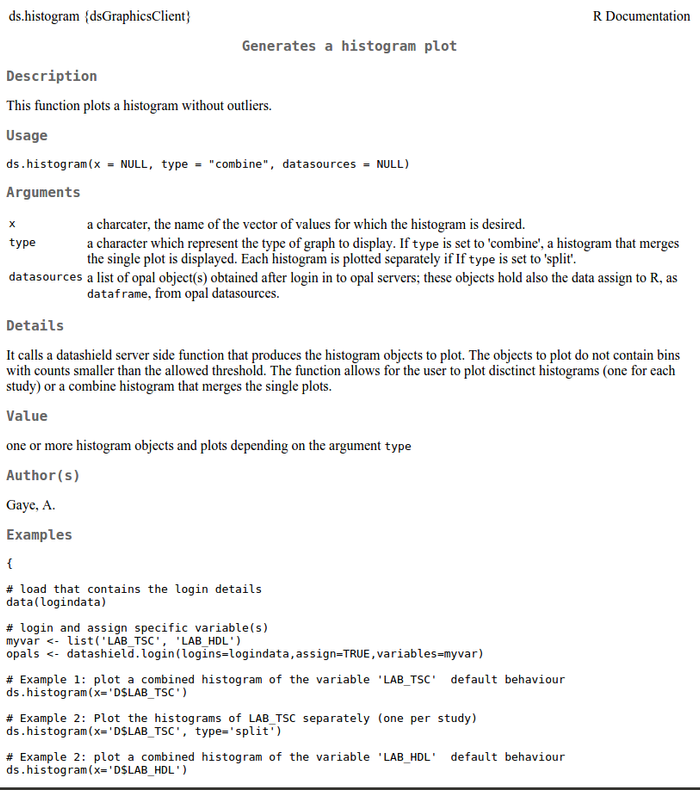
Once you have loaded the DataSHIELD packages, information about individual functions can be found on the function manual page including:
- description: what the function does
- usage: shows the syntax of the function including all arguments - this is a generalised form of how you would use the function
- arguments: of the function. These are all the things you can customise in the function
- details and values: give some additional information about the function
- examples: of how the function is run. You will be able to copy and paste these examples into R/RStudio to run yourself
You can access the help page of a function in a number of ways:
Opening help files in R
To open up the help page within R/RStudio:
> help(insert_function_name)
# an example for ds.histogram
> help(ds.histogram)
an equivalent command is to use the help operator ?:
> ?(ds.histogram)
Opening up help webpages
To open up the function help page in a webpage:
> options(help_type="html")
> help(ds.histogram)
# alternatively use
> ?(ds.histogram)
An example function help webpage for ds.histogram is given below.
, multiple selections available,

DataSHIELD Wiki by DataSHIELD is licensed under a Creative Commons Attribution-ShareAlike 4.0 International License. Based on a work at http://www.datashield.ac.uk/wiki